
Every part of your shop. Woven together.
Repairs, orders, customers, inventory, and accounting. One connected system for everything you do.
Turn your phone sideways for the desktop view.
Always know where an order stands, with guidance from quote to approval, fulfillment, and invoice.


- 1108Nora BennettOct 5$1,933.48Released to purchasing
- 1107Harbor Point Dental GroupOct 5$6,412.80Awaiting deposit
- 1106Leo MartinezOct 4$106.99Invoice
- 1105Marisol VegaOct 4$2,612.99Quote sent
- 1104Lakeside Architects LLCOct 3$11,874.00Approved
- 1103Ben OkaforOct 3$326.59Unapproved
- 1102Ava LindqvistOct 2$543.48Ready for pickup
- 1101St. Albans Public LibraryOct 1$4,788.00Partially fulfilled
Page Total$28,598.33
Five parts of your shop. One set of records.
Tools for every role. One picture for the whole shop.
Orders and payments
From quote to paid. All on one order.
Quote it, take a deposit, invoice what's in stock, and keep the rest on backorder.
Take card payments at the counter, and process returns, exchanges, and refunds straight from the order.
Anyone on your team can open an order and see what's still due.
- Deposits of 25%, 50%, or paid in full
- Split one payment across card, cash, and store credit
- See where every order stands at a glance
Repairs
See every repair. Know what's next.
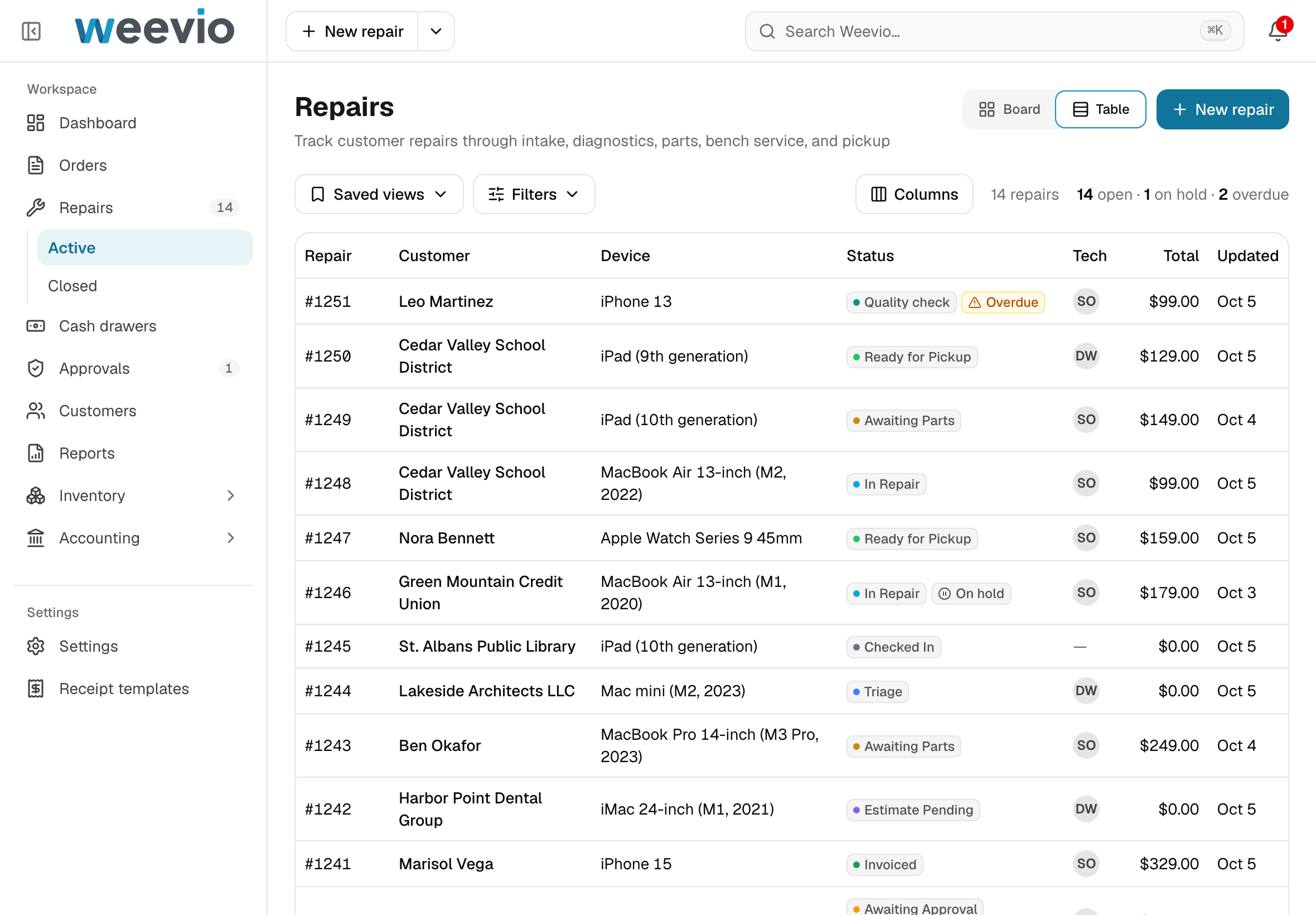
See the whole bench in a board view, or switch to a table view when you need the details.
The board view only offers the moves that make sense next, and customers can approve by signature, phone, email, or a simple page with no login.
Check warranty status, Repair Readiness (including Find My), and diagnostics without leaving the repair, through our GSX integration*.
- Saved views with open, on hold, and overdue counts
- Approval by signature, phone, email, or a no-login page
- Create GSX repairs directly from Weevio*
Apple first, with more brands added as shops need them.
- #1248Cedar Valley School DistrictMacBook Air 13-inch (M2, 2022)Oct 8
- #1246Green Mountain Credit UnionMacBook Air 13-inch (M1, 2020)Oct 9
- #1251Leo MartineziPhone 13Oct 4
- #1247Nora BennettApple Watch Series 9 45mmOct 5
- #1250Cedar Valley School DistrictiPad (9th generation)Oct 6
| Repair | Customer | Status |
|---|---|---|
| #1246 | Green Mountain Credit Union | In Repair |
| #1248 | Cedar Valley School District | In Repair |
| #1251 | Leo Martinez | Quality check |
| #1247 | Nora Bennett | Ready for Pickup |
| #1250 | Cedar Valley School District | Ready for Pickup |
Customers
Every customer, and exactly where you stand.
Keep all of a customer's contacts and addresses on a single record, with default billing and shipping addresses.
See what they owe by age, the deposits you hold, and their store credit, each in its own place.
Record a payment and apply it to the oldest invoice first, or to the invoices you choose.
- Multiple contacts and addresses per customer
- Owed by age: current, 30, 60, and 90+ days
- Repairs and orders one click away
- Current$4,180.00
- 30 days$2,615.50
- Available credit
- $18,204.50
- Credit limit
- $25,000.00
Applies automatically when an invoice is posted.
- Order 1093Check · Sep 30, 2026$5,940.00
Never expires. Usable at any location.
- ReturnIssued Sep 10, 2026+$85.00
Inventory
Know what you have, where it is, and what's on the way.
Sell multiple colors, sizes, and configurations from a single base product, and see stock at your locations and at Ingram and TD Synnex†.
Create purchase orders, receive items as they arrive, and follow every serial number from receiving to sale.
- A SKU, barcode, and price for every color and size
- Multiple vendors per product, each with its own part number
- Scan to receive, and count what actually arrives
- Sync your products and stock levels to Shopify, and import Shopify orders back into Weevio.
Available to sell
7
BurlingtonMAIN
└ Repair Bench
On hand 5
Available
5
MontpelierMONT
└ Main Stockroom
On hand 2
Available
2
Accounting
Real costs, real margins, and books that keep up.
Instead of blending costs into a weighted average, Weevio tracks the cost of every delivery and uses the oldest stock first.
When you invoice, Weevio writes the entries for your books, and a late vendor bill updates your margins without rewriting past sales.
Reconcile your bank statement, deposits, and card payouts, and open any order to see exactly how it posted.
- Costs tracked by delivery, not averaged
- Bank reconciliation with statement import
- How this posted, on every order
Try selling one more.
- Aug 31 deliveryOldest6 at $175.00 each6 used, 0 left
- Sep 27 delivery4 at $189.00 each2 used, 2 left
- Oct 5 delivery5 at $182.00 each0 used, 5 left
- 6 × $175.00$1,050.00
- 2 × $189.00$378.00
- Cost
- $1,428.00
- Margin
- 45.7%
Oldest delivery prices.
- Cost
- $1,448.53
- Margin
- 45.0%
Blends the deliveries.
Trace each sale’s cost back to its delivery.
Same stock, same sales.
Every day
Built to make everyday chaos less chaotic.
Search from any screen, see who else is on a record, and get a manager's OK without leaving the counter.
Find anything with ⌘K
Press ⌘K or Ctrl+K to search across repairs, orders, customers, products, and more, or narrow the search to just one.
4 resultsMatches4 shownCedar Valley School DistrictCUST-10214 · techdesk@cedarvalley.example · (802) 555-0140Matched nameCustomersRepair #1248Cedar Valley School District · MacBook Air 13-inch (M2, 2022)Matched customerIn repairRepairsRepair #1249Cedar Valley School District · iPad (10th generation)Matched customerAwaiting partsRepairsOrder 1093Cedar Valley School District · PO-26-0412Matched customerApprovedOrdersView all results for “cedar”Across your workspaceWork on the same record
See who else is on a record, and if two people change the same field, choose whose change to keep.
Repair #1248In RepairAlso on this record- Dana Whitfield — editing Service details
- Priya Shah — viewing
Dana Whitfield changed this while you were editing.For this field, keep yours or use Dana's.
Promised date- Dana's
- Oct 8, 2026
- Yours
- Oct 9, 2026
The full story of every record
Every record keeps its full history: who changed what, and when.
HistoryRepair #1248
- Repair · Updated (Status)Oct 5, 10:12 AMby Sam Ortiz
1 change
Status: Awaiting Parts → In Repair - Part · Added (Quantity)Oct 5, 9:58 AMby Sam Ortiz
Fields
MacBook Air 13" (M2) Display Assembly: 1 - Repair · Updated (Promised date)Oct 4, 4:20 PMby Dana Whitfield
1 change
Promised date: Oct 7, 2026 → Oct 8, 2026 - Repair · Updated (Status)Oct 3, 2:06 PMby Priya Shah
1 change
Status: Awaiting Approval → Awaiting Parts - Customer approval · Created (How they agreed)Oct 3, 2:05 PMby Priya Shah
Fields
How they agreed: By phone · Elena Brooks - Repair · Created (9 fields)Oct 3, 1:40 PMby Priya Shah
A manager, right when you need one
A manager approves on the spot with their PIN, or gets the request on their own screen.
Manager Approval RequiredWhat you're approvingLower the deposit from $5,937.00 to $2,968.50Order 1104 · Lakeside Architects LLCWho is authorizing this? *Search approvers…Dana WhitfieldManagerApproval PIN *The manager enters their own PIN.
123456789Clear0DeleteWhat you're approvingLower the deposit from $5,937.00 to $2,968.50Order 1104 · Lakeside Architects LLCWhy is this being approved? *“Long-standing account”Waiting for a manager. Sent to 1 manager.
Expires in 13:00If a manager comes over, choose “Manager here” and they can enter their PIN on this screen.
CancelMultiple locations. One business.
See stock by location and storage area, fulfill orders from whichever location has stock, and share customers and employees across all of them.
Stock by LocationAvailable to sell
7
BurlingtonMAIN
└ Repair Bench
On hand 5
Available
5
MontpelierMONT
└ Main Stockroom
On hand 2
Available
2
A dashboard for every role
Each role opens to a dashboard made for them, and reports can be run for any date range and exported to CSV.
Sales summaryOrders booked, invoices posted and payments received by day.
Export CSVRevenue and payments by day$18,487.02 posted · $15,779.09 receivedRevenue posted totals $18,487.02, highest on Sep 29 at $4,126.40. Payments received total $15,779.09, highest on Sep 30 at $3,529.00.
Sales summary by day Date Revenue Payments received Sep 29 $4,126.40 $2,884.10 Sep 30 $1,863.25 $3,529.00 Oct 1 $2,978.15 $2,184.62 Oct 2 $2,310.90 $3,412.18 Oct 3 $1,487.25 $925.40 Oct 4 $3,522.03 $1,877.05 Oct 5 $2,199.04 $966.74 Total $18,487.02 $15,779.09 Phone, tablet, or desktop
Weevio adjusts to any screen size, so it works on any device with a web browser and an internet connection.
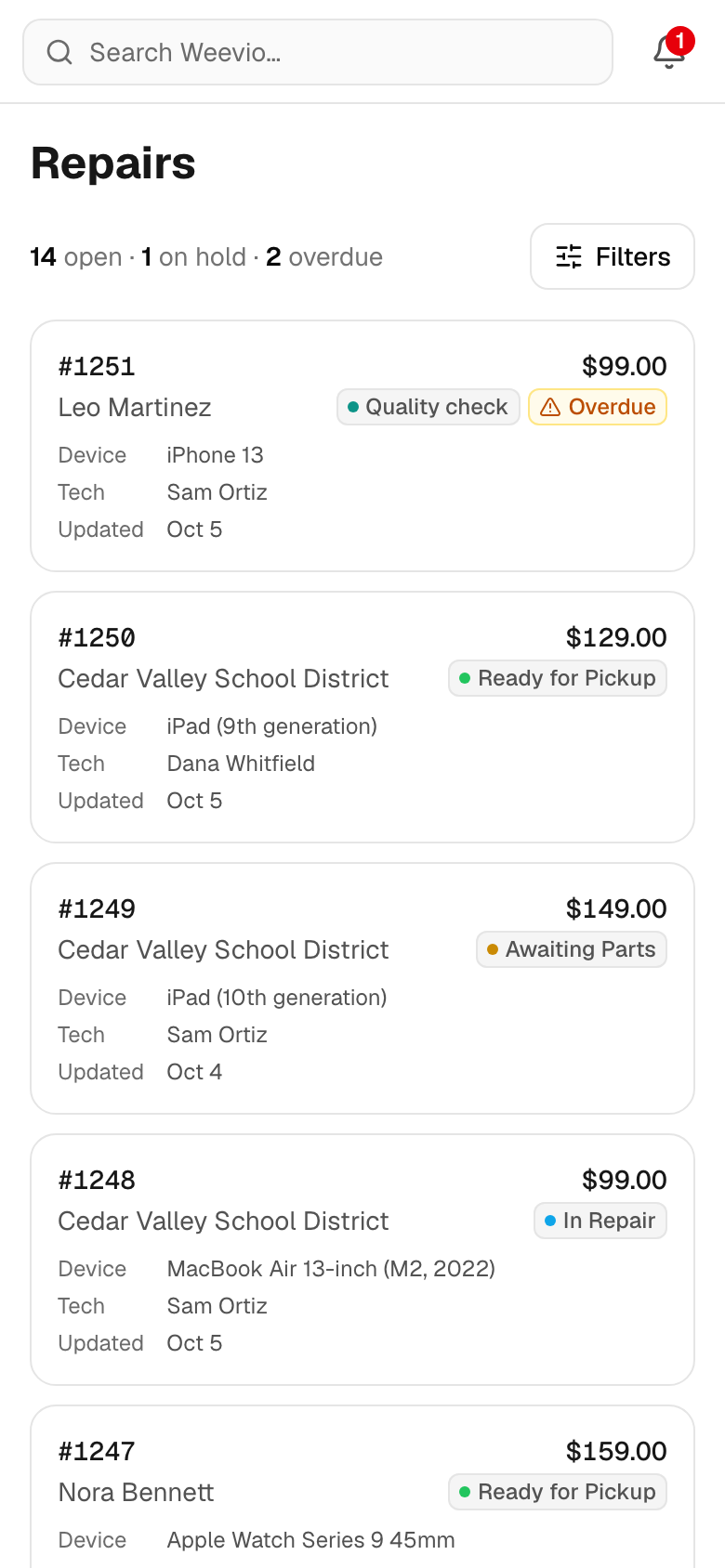
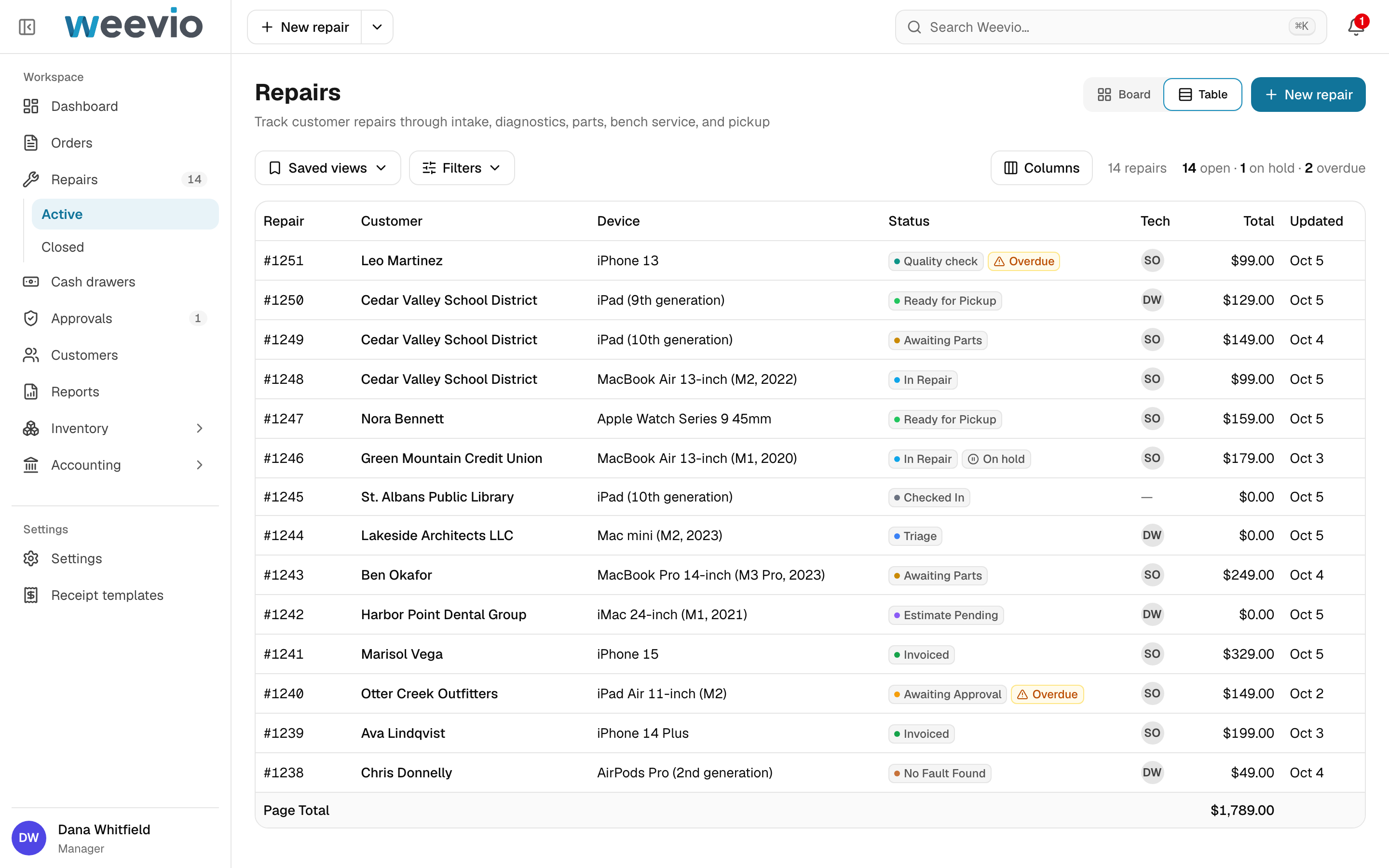
Add to Home Screen and Weevio opens like an app.
Scan instead of typing
Scan barcodes and serial numbers with an iPhone or iPad camera, or any USB or Bluetooth scanner.
Scan with cameraHold the barcode inside the frame.
Torch on660543527811×1OtterBox Symmetry Series — iPhone 15 · BlackOB-SYM-IP15-BLK · 660543527811Scan wherever you see the camera button- Adding items to an order
- Repair check-in
- Receiving
- Product search
USB and Bluetooth scanners work in every scan field too. No setup needed.
DoneThe same screen, day or night.
Each device keeps its own setting, so the bench can run dark while the counter stays light.
LightDark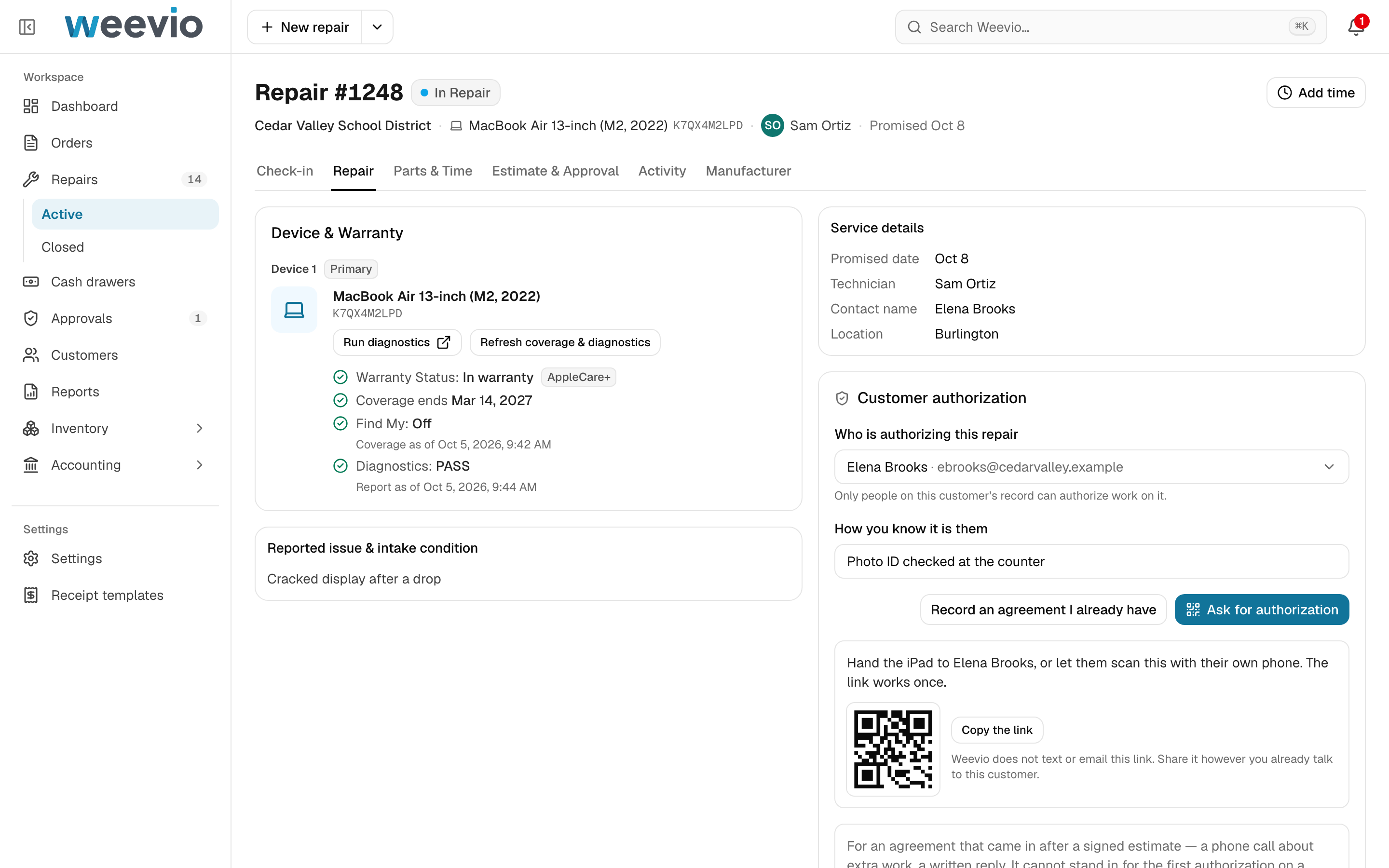
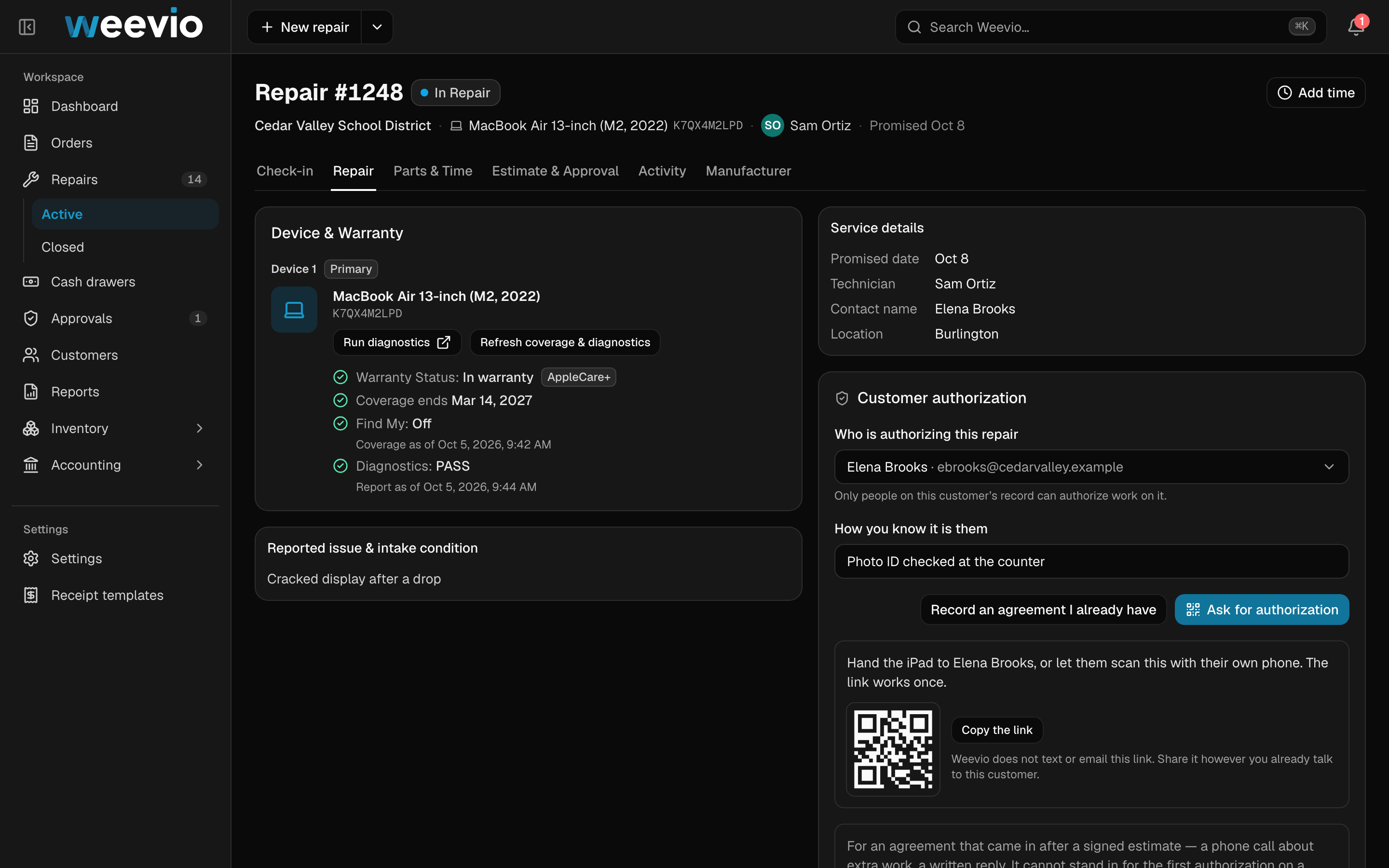
The same repair page in light mode and in dark mode.
Integrations
Works with the services your shop relies on.

Payments
Take card payments at the counter on Stripe card readers, refund from the order, and match payouts to your bank deposits.
Apple Global Service Exchange
Repair
Check warranty status, Repair Readiness (including Find My), and diagnostics, create GSX repairs directly from Weevio, and reconcile invoices and labor reimbursements*.
AppleCare Connect
Sales channel
Sell AppleCare and auto-enroll each device at the point of sale*.

Distributor
Keep Ingram Micro SKUs and costs on each product, check availability, and update costs automatically. Submit purchase orders and DEP enrollments, get tracking numbers, notify customers when orders ship, and reconcile invoices†.

Distributor
Keep TD SYNNEX SKUs and costs on each product, check availability, and update costs automatically. Submit purchase orders, get tracking numbers, notify customers when orders ship, and reconcile invoices†.

Sales channel
Sync your products and stock levels to Shopify, and import Shopify orders back into Weevio.

Shipping
Print shipping labels and track packages from the order.
Switching to Weevio
Moving from PIMS is simple.
Connect PIMS, choose how much history to bring over, and click Import. Every order stays linked to its customer, and every line item to its product.
Import from PIMS
Bring your locations, staff, customers, products, orders and repair orders into Weevio.
Customers and products import in full. Choose how far back to bring orders and repair orders.
Order & repair history: Last year
Done — your records are ready to explore in Weevio.
- LocationsImported2
- StaffImported8
- CustomersContacts & balancesImported624
- ProductsStock & vendor detailsImported1,850
- OrdersItems & paymentsImported2,106
- Repair ordersParts & service historyImported932
Choose your history. Click Import. Weevio handles the import.
Bring your history over
Import 30 days, a year, or everything. Customers, products, and parts come along with the orders that use them, so nothing loses its connections. Imported records live in Weevio and stay read-only until you edit them.
Pick up where you left off
Open orders and repairs come across with the right status in Weevio, so your team can pick up right where they left off in PIMS. New work starts in Weevio, with your imported history right beside it.
Not on PIMS?
We'll help you move from any system. Bring your data in with a CSV import, and we'll help you get it out of your current software.
Questions, answered.
Can my shop use Weevio today?
Weevio is in development, with our early access program launching in 2027. Sign up to hear as soon as it's available, and tell us if you'd like to take part in early access.
Who is Weevio for?
Retail shops that sell, repair, or both, including Apple service providers and computer stores. Use Weevio for repairs, orders, customers, inventory, and accounting, or just the parts you need. It works at the counter, at the bench, on-site, and in the back office.
We use PIMS today. Can we bring our history?
Yes. Your customers, products, orders, and repairs come into Weevio from PIMS. During your transition, records keep updating from PIMS, and they stay read-only in Weevio until you choose to edit them.
What hardware do we need?
Any device with a web browser and an internet connection, including tablets, phones, and computers. Most of the hardware you use with PIMS or another point-of-sale system will most likely work with Weevio too, including receipt printers and cash drawers. You can add Weevio to your Home Screen so it opens like an app. To scan, use an iPhone or iPad camera, or any USB or Bluetooth scanner.
Does Weevio work with Apple Global Service Exchange?
Yes. Through our GSX integration*, check warranty status, Repair Readiness (including Find My), and diagnostics, and create GSX repairs directly from Weevio. Apple comes first, with more brands added as shops need them.
Does Weevio include accounting?
Yes. Every transaction flows through to accounting: receiving product on a purchase order, selling it on an order, transferring product between locations, and expenses. You can also reconcile bank statements, deposits, and card payouts, and open any order to see exactly how it posted.
How does Weevio track cost of goods?
Instead of blending costs into a weighted average, Weevio tracks the cost of every delivery and uses the oldest stock first (first in, first out). If a vendor bills a different price later, margins update without rewriting past sales.
How much does Weevio cost?
We don't list prices on the website yet. Leave your shop name and work email, and we'll talk it through with you.

Stay in touch
Provide your email below to be among the first businesses to know about our launch. Add your shop name or a little note if you'd like, and check the box if you'd like to be part of our early access program.